See Where the Work Comes Off Your Plate
See Where the Work Comes Off Your Plate
See Where the Work Comes Off Your Plate
AvodahMed applies AI across the clinical workflow
—before, during, and after the visit
—to handle the repetitive, structural, and language
-heavy work, while clinicians remain in control of care, decisions, and the medical record.
AvodahMed applies AI across the clinical workflow
—before, during, and after the visit
—to handle the repetitive, structural, and language
-heavy work, while clinicians remain in control of care, decisions, and the medical record.
AvodahMed applies AI across the clinical workflow—before, during, and after the visit—to handle the repetitive, structural, and language
-heavy work, while clinicians remain in control of care, decisions, and the medical record.
Filter By:
All
Core Platform
Before Visit
During the Visit
After the Visit
EHR Integration
Access & Reliability
AvodahMed is designed for consistent, reliable access across environments without compromising security or clinical control.
Any Device
Clinicians can access AvodahMed on desktop, laptop, or mobile, allowing documentation to happen on their device, on their terms, and within their time constraints. The mobile app synchronizes live sessions and enables clinicians to capture, edit, and submit notes while moving between locations.
AvodahMed is available on both iOS and Android and supports real-time transcription and note review across devices.
EHR and Workflow Continuity
AvodahMed integrates with EHRs, maintaining workflow continuity inside the EHR. For non-integrated users, QuickStart mode enables immediate use without disrupting existing systems.
Secure Access
Single Sign-On (SSO) provides secure, enterprise-grade access while minimizing login friction and reducing barriers to adoption.
Learn More
Athena
AvodahMed integrates with athenahealth to support clinical notes, diagnoses, referral automations, and structured documentation outputs within the care workflow.
How It Works
Clinicians document in AvodahMed, review and approve the output, and securely send it to athenahealth without duplicate data entry. The workflow operates across desktop, laptop, and mobile devices, positioning AvodahMed as the single source of automation while athenahealth remains the system of record and ownership in the EHR.
Learn More
Capture the Encounter
AvodahMed captures the clinical encounter through live transcription and provider-led dictation, ensuring accurate documentation without disrupting clinical flow.
Live Transcription
Clinical conversations are captured in real time to support documentation while allowing the clinician to remain focused on the patient.
Clinical Dictation
Providers can dictate directly to guide nuanced documentation, preserving clinical intent, judgment, and context.
Learn More
Custom Integrations
AvodahMed supports custom EHR and workflow integrations for organizations with specialized clinical, technical, or operational requirements.
Our team works with select customers to design and implement integrations that align with existing systems, security standards, and documentation workflows—without compromising clinician control or record integrity.
Learn More
Epic
AvodahMed integrates directly with Epic to support encounter notes, referral documentation, and structured post-visit outputs without fragmenting the clinical record.
How It Works
Clinicians finalize documentation in AvodahMed, which is then securely transferred into Epic while preserving full clinician review and sign-off control. The workflow works on desktop, laptop, and mobile devices, ensuring AvodahMed functions as a single source of automation while Epic remains the system of record and ownership.
Learn More
Finalize & Export
AvodahMed ensures that documentation is reviewed, finalized, and delivered through controlled workflows that protect record integrity while supporting downstream clinical and administrative needs.
Finalize and Export to the EHR
Clinicians can send finalized documentation directly into their EHR, preserving record integrity and eliminating duplicate entry.
Download, Copy, or Print
Documentation outputs can also be downloaded, copied, or printed as needed, providing flexibility for downstream workflows and external use.
Learn More
Language & Accessibility
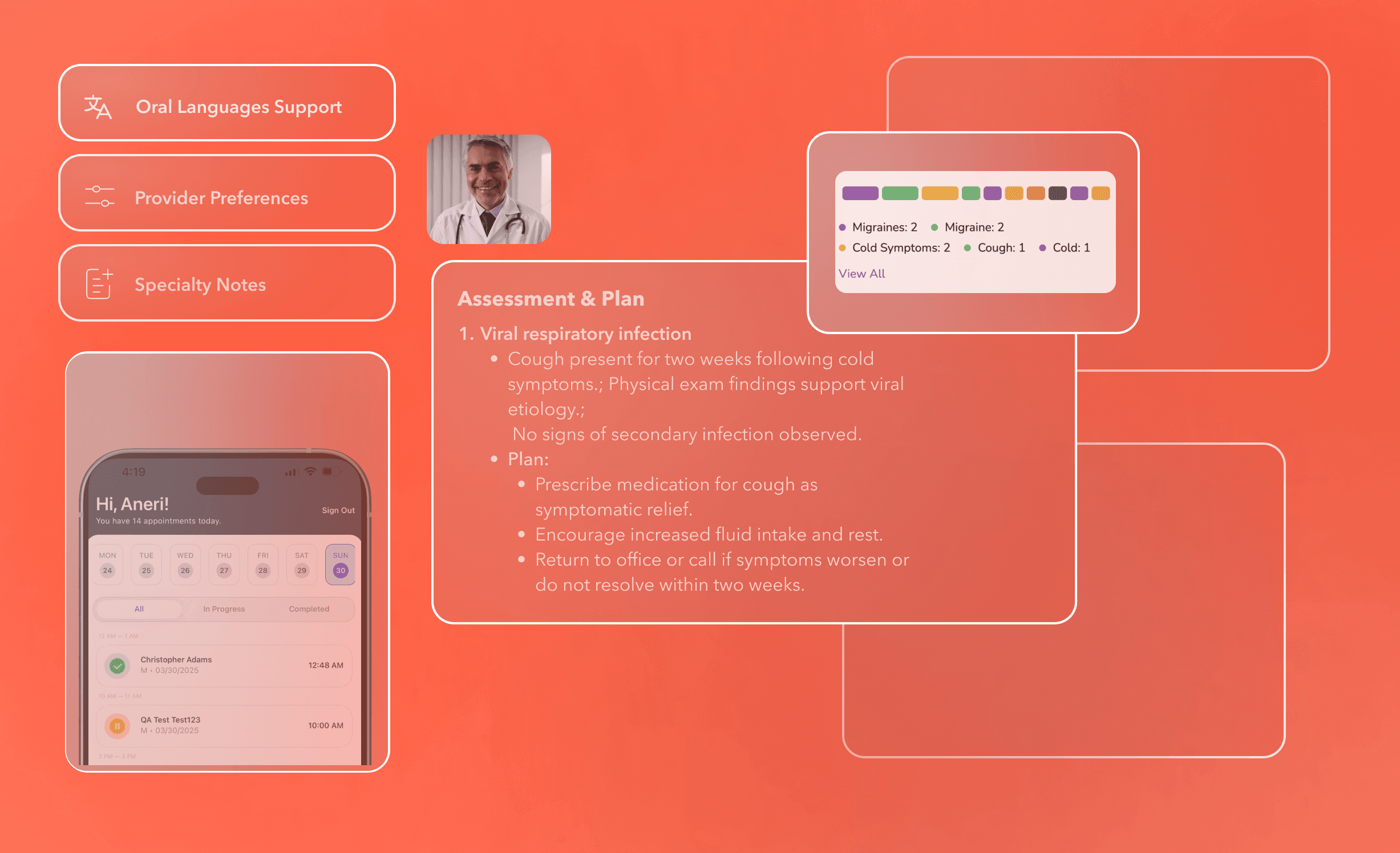
AvodahMed expands access to care by supporting multilingual, oral-language clinical encounters without adding documentation burden.
Oral Language Support (Beta)
Ambient Scribe captures the patient–clinician conversation in the patient’s spoken language during the visit, displays a live transcript in real time, and generates a structured clinical note in English for clinician review and approval.
This feature is currently available in Beta with select customers piloting multilingual documentation in real clinical workflows and providing feedback on accuracy, usability, and impact.
Beta currently supports encounters originating in Arabic, Cantonese, English, French, Korean, Mandarin, Portuguese, Russian, Spanish, Tagalog, German, Italian, and Japanese.
Learn More
Order & Coding
AvodahMed supports order placement and coding by assisting documentation workflows inside the EHR.
Order/Lab Automation
Based on the clinical conversation and visit context, AvodahMed surfaces relevant labs and orders and prepares them in the EHR for clinician review and final submission.
Coding Assistance
Coding support is generated in alignment with the clinical documentation to assist accurate, consistent coding without removing clinician oversight.
Diagnosis to EHR
Recommended diagnoses and ICD-10 codes are derived from the encounter discussion, patient history, and provider or practice best practices and are sent to the EHR for clinician review and approval.
Learn More
Patient Context
AvodahMed surfaces essential patient information at the point of documentation to support informed clinical decisions.
Patient Details
Clinicians have centralized access to patient demographics and relevant clinical history without leaving the documentation workflow.
Patient Order History
Past labs and orders are available for review before placing new orders, helping clinicians avoid duplication and maintain continuity of care.
Learn More
Personalization & Specialty Support
AvodahMed adapts documentation behavior to the individual provider and clinical specialty rather than forcing a one-size-fits-all workflow.
Provider Preferences
Clinicians can customize note structure, dictation style, and documentation defaults so the system reflects how they practice, not how a generic template was designed.
Specialty Notes
Documentation formats are aligned to specialty-specific workflows, terminology, and clinical expectations to reduce rework and preserve clinical intent.
Learn More
Filter By:
All
Core Platform
Before Visit
During the Visit
After the Visit
EHR Integration
Access & Reliability
AvodahMed is designed for consistent, reliable access across environments without compromising security or clinical control.
Any Device
Clinicians can access AvodahMed on desktop, laptop, or mobile, allowing documentation to happen on their device, on their terms, and within their time constraints. The mobile app synchronizes live sessions and enables clinicians to capture, edit, and submit notes while moving between locations.
AvodahMed is available on both iOS and Android and supports real-time transcription and note review across devices.
EHR and Workflow Continuity
AvodahMed integrates with EHRs, maintaining workflow continuity inside the EHR. For non-integrated users, QuickStart mode enables immediate use without disrupting existing systems.
Secure Access
Single Sign-On (SSO) provides secure, enterprise-grade access while minimizing login friction and reducing barriers to adoption.
Athena
AvodahMed integrates with athenahealth to support clinical notes, diagnoses, referral automations, and structured documentation outputs within the care workflow.
How It Works
Clinicians document in AvodahMed, review and approve the output, and securely send it to athenahealth without duplicate data entry. The workflow operates across desktop, laptop, and mobile devices, positioning AvodahMed as the single source of automation while athenahealth remains the system of record and ownership in the EHR.
Capture the Encounter
AvodahMed captures the clinical encounter through live transcription and provider-led dictation, ensuring accurate documentation without disrupting clinical flow.
Live Transcription
Clinical conversations are captured in real time to support documentation while allowing the clinician to remain focused on the patient.
Clinical Dictation
Providers can dictate directly to guide nuanced documentation, preserving clinical intent, judgment, and context.
Custom Integrations
AvodahMed supports custom EHR and workflow integrations for organizations with specialized clinical, technical, or operational requirements.
Our team works with select customers to design and implement integrations that align with existing systems, security standards, and documentation workflows—without compromising clinician control or record integrity.
Epic
AvodahMed integrates directly with Epic to support encounter notes, referral documentation, and structured post-visit outputs without fragmenting the clinical record.
How It Works
Clinicians finalize documentation in AvodahMed, which is then securely transferred into Epic while preserving full clinician review and sign-off control. The workflow works on desktop, laptop, and mobile devices, ensuring AvodahMed functions as a single source of automation while Epic remains the system of record and ownership.
Finalize & Export
AvodahMed ensures that documentation is reviewed, finalized, and delivered through controlled workflows that protect record integrity while supporting downstream clinical and administrative needs.
Finalize and Export to the EHR
Clinicians can send finalized documentation directly into their EHR, preserving record integrity and eliminating duplicate entry.
Download, Copy, or Print
Documentation outputs can also be downloaded, copied, or printed as needed, providing flexibility for downstream workflows and external use.
Language & Accessibility
AvodahMed expands access to care by supporting multilingual, oral-language clinical encounters without adding documentation burden.
Oral Language Support (Beta)
Ambient Scribe captures the patient–clinician conversation in the patient’s spoken language during the visit, displays a live transcript in real time, and generates a structured clinical note in English for clinician review and approval.
This feature is currently available in Beta with select customers piloting multilingual documentation in real clinical workflows and providing feedback on accuracy, usability, and impact.
Beta currently supports encounters originating in Arabic, Cantonese, English, French, Korean, Mandarin, Portuguese, Russian, Spanish, Tagalog, German, Italian, and Japanese.
Order & Coding
AvodahMed supports order placement and coding by assisting documentation workflows inside the EHR.
Order/Lab Automation
Based on the clinical conversation and visit context, AvodahMed surfaces relevant labs and orders and prepares them in the EHR for clinician review and final submission.
Coding Assistance
Coding support is generated in alignment with the clinical documentation to assist accurate, consistent coding without removing clinician oversight.
Diagnosis to EHR
Recommended diagnoses and ICD-10 codes are derived from the encounter discussion, patient history, and provider or practice best practices and are sent to the EHR for clinician review and approval.
Patient Context
AvodahMed surfaces essential patient information at the point of documentation to support informed clinical decisions.
Patient Details
Clinicians have centralized access to patient demographics and relevant clinical history without leaving the documentation workflow.
Patient Order History
Past labs and orders are available for review before placing new orders, helping clinicians avoid duplication and maintain continuity of care.
Personalization & Specialty Support
AvodahMed adapts documentation behavior to the individual provider and clinical specialty rather than forcing a one-size-fits-all workflow.
Provider Preferences
Clinicians can customize note structure, dictation style, and documentation defaults so the system reflects how they practice, not how a generic template was designed.
Specialty Notes
Documentation formats are aligned to specialty-specific workflows, terminology, and clinical expectations to reduce rework and preserve clinical intent.
Filter By:
All
Core Platform
Before Visit
During the Visit
After the Visit
EHR Integration
Access & Reliability
AvodahMed is designed for consistent, reliable access across environments without compromising security or clinical control.
Any Device
Clinicians can access AvodahMed on desktop, laptop, or mobile, allowing documentation to happen on their device, on their terms, and within their time constraints. The mobile app synchronizes live sessions and enables clinicians to capture, edit, and submit notes while moving between locations.
AvodahMed is available on both iOS and Android and supports real-time transcription and note review across devices.
EHR and Workflow Continuity
AvodahMed integrates with EHRs, maintaining workflow continuity inside the EHR. For non-integrated users, QuickStart mode enables immediate use without disrupting existing systems.
Secure Access
Single Sign-On (SSO) provides secure, enterprise-grade access while minimizing login friction and reducing barriers to adoption.
Athena
AvodahMed integrates with athenahealth to support clinical notes, diagnoses, referral automations, and structured documentation outputs within the care workflow.
How It Works
Clinicians document in AvodahMed, review and approve the output, and securely send it to athenahealth without duplicate data entry. The workflow operates across desktop, laptop, and mobile devices, positioning AvodahMed as the single source of automation while athenahealth remains the system of record and ownership in the EHR.
Capture the Encounter
AvodahMed captures the clinical encounter through live transcription and provider-led dictation, ensuring accurate documentation without disrupting clinical flow.
Live Transcription
Clinical conversations are captured in real time to support documentation while allowing the clinician to remain focused on the patient.
Clinical Dictation
Providers can dictate directly to guide nuanced documentation, preserving clinical intent, judgment, and context.
Custom Integrations
AvodahMed supports custom EHR and workflow integrations for organizations with specialized clinical, technical, or operational requirements.
Our team works with select customers to design and implement integrations that align with existing systems, security standards, and documentation workflows—without compromising clinician control or record integrity.
Epic
AvodahMed integrates directly with Epic to support encounter notes, referral documentation, and structured post-visit outputs without fragmenting the clinical record.
How It Works
Clinicians finalize documentation in AvodahMed, which is then securely transferred into Epic while preserving full clinician review and sign-off control. The workflow works on desktop, laptop, and mobile devices, ensuring AvodahMed functions as a single source of automation while Epic remains the system of record and ownership.
Finalize & Export
AvodahMed ensures that documentation is reviewed, finalized, and delivered through controlled workflows that protect record integrity while supporting downstream clinical and administrative needs.
Finalize and Export to the EHR
Clinicians can send finalized documentation directly into their EHR, preserving record integrity and eliminating duplicate entry.
Download, Copy, or Print
Documentation outputs can also be downloaded, copied, or printed as needed, providing flexibility for downstream workflows and external use.
Language & Accessibility
AvodahMed expands access to care by supporting multilingual, oral-language clinical encounters without adding documentation burden.
Oral Language Support (Beta)
Ambient Scribe captures the patient–clinician conversation in the patient’s spoken language during the visit, displays a live transcript in real time, and generates a structured clinical note in English for clinician review and approval.
This feature is currently available in Beta with select customers piloting multilingual documentation in real clinical workflows and providing feedback on accuracy, usability, and impact.
Beta currently supports encounters originating in Arabic, Cantonese, English, French, Korean, Mandarin, Portuguese, Russian, Spanish, Tagalog, German, Italian, and Japanese.
Order & Coding
AvodahMed supports order placement and coding by assisting documentation workflows inside the EHR.
Order/Lab Automation
Based on the clinical conversation and visit context, AvodahMed surfaces relevant labs and orders and prepares them in the EHR for clinician review and final submission.
Coding Assistance
Coding support is generated in alignment with the clinical documentation to assist accurate, consistent coding without removing clinician oversight.
Diagnosis to EHR
Recommended diagnoses and ICD-10 codes are derived from the encounter discussion, patient history, and provider or practice best practices and are sent to the EHR for clinician review and approval.
Patient Context
AvodahMed surfaces essential patient information at the point of documentation to support informed clinical decisions.
Patient Details
Clinicians have centralized access to patient demographics and relevant clinical history without leaving the documentation workflow.
Patient Order History
Past labs and orders are available for review before placing new orders, helping clinicians avoid duplication and maintain continuity of care.
Personalization & Specialty Support
AvodahMed adapts documentation behavior to the individual provider and clinical specialty rather than forcing a one-size-fits-all workflow.
Provider Preferences
Clinicians can customize note structure, dictation style, and documentation defaults so the system reflects how they practice, not how a generic template was designed.
Specialty Notes
Documentation formats are aligned to specialty-specific workflows, terminology, and clinical expectations to reduce rework and preserve clinical intent.
Filter By:
All
Core Platform
Before Visit
During the Visit
After the Visit
EHR Integration
Access & Reliability
AvodahMed is designed for consistent, reliable access across environments without compromising security or clinical control.
Any Device
Clinicians can access AvodahMed on desktop, laptop, or mobile, allowing documentation to happen on their device, on their terms, and within their time constraints. The mobile app synchronizes live sessions and enables clinicians to capture, edit, and submit notes while moving between locations.
AvodahMed is available on both iOS and Android and supports real-time transcription and note review across devices.
EHR and Workflow Continuity
AvodahMed integrates with EHRs, maintaining workflow continuity inside the EHR. For non-integrated users, QuickStart mode enables immediate use without disrupting existing systems.
Secure Access
Single Sign-On (SSO) provides secure, enterprise-grade access while minimizing login friction and reducing barriers to adoption.
Learn More
Athena
AvodahMed integrates with athenahealth to support clinical notes, diagnoses, referral automations, and structured documentation outputs within the care workflow.
How It Works
Clinicians document in AvodahMed, review and approve the output, and securely send it to athenahealth without duplicate data entry. The workflow operates across desktop, laptop, and mobile devices, positioning AvodahMed as the single source of automation while athenahealth remains the system of record and ownership in the EHR.
Learn More
Capture the Encounter
AvodahMed captures the clinical encounter through live transcription and provider-led dictation, ensuring accurate documentation without disrupting clinical flow.
Live Transcription
Clinical conversations are captured in real time to support documentation while allowing the clinician to remain focused on the patient.
Clinical Dictation
Providers can dictate directly to guide nuanced documentation, preserving clinical intent, judgment, and context.
Learn More
Custom Integrations
AvodahMed supports custom EHR and workflow integrations for organizations with specialized clinical, technical, or operational requirements.
Our team works with select customers to design and implement integrations that align with existing systems, security standards, and documentation workflows—without compromising clinician control or record integrity.
Learn More
Epic
AvodahMed integrates directly with Epic to support encounter notes, referral documentation, and structured post-visit outputs without fragmenting the clinical record.
How It Works
Clinicians finalize documentation in AvodahMed, which is then securely transferred into Epic while preserving full clinician review and sign-off control. The workflow works on desktop, laptop, and mobile devices, ensuring AvodahMed functions as a single source of automation while Epic remains the system of record and ownership.
Learn More
Finalize & Export
AvodahMed ensures that documentation is reviewed, finalized, and delivered through controlled workflows that protect record integrity while supporting downstream clinical and administrative needs.
Finalize and Export to the EHR
Clinicians can send finalized documentation directly into their EHR, preserving record integrity and eliminating duplicate entry.
Download, Copy, or Print
Documentation outputs can also be downloaded, copied, or printed as needed, providing flexibility for downstream workflows and external use.
Learn More
Language & Accessibility
AvodahMed expands access to care by supporting multilingual, oral-language clinical encounters without adding documentation burden.
Oral Language Support (Beta)
Ambient Scribe captures the patient–clinician conversation in the patient’s spoken language during the visit, displays a live transcript in real time, and generates a structured clinical note in English for clinician review and approval.
This feature is currently available in Beta with select customers piloting multilingual documentation in real clinical workflows and providing feedback on accuracy, usability, and impact.
Beta currently supports encounters originating in Arabic, Cantonese, English, French, Korean, Mandarin, Portuguese, Russian, Spanish, Tagalog, German, Italian, and Japanese.
Learn More
Order & Coding
AvodahMed supports order placement and coding by assisting documentation workflows inside the EHR.
Order/Lab Automation
Based on the clinical conversation and visit context, AvodahMed surfaces relevant labs and orders and prepares them in the EHR for clinician review and final submission.
Coding Assistance
Coding support is generated in alignment with the clinical documentation to assist accurate, consistent coding without removing clinician oversight.
Diagnosis to EHR
Recommended diagnoses and ICD-10 codes are derived from the encounter discussion, patient history, and provider or practice best practices and are sent to the EHR for clinician review and approval.
Learn More
Patient Context
AvodahMed surfaces essential patient information at the point of documentation to support informed clinical decisions.
Patient Details
Clinicians have centralized access to patient demographics and relevant clinical history without leaving the documentation workflow.
Patient Order History
Past labs and orders are available for review before placing new orders, helping clinicians avoid duplication and maintain continuity of care.
Learn More
Personalization & Specialty Support
AvodahMed adapts documentation behavior to the individual provider and clinical specialty rather than forcing a one-size-fits-all workflow.
Provider Preferences
Clinicians can customize note structure, dictation style, and documentation defaults so the system reflects how they practice, not how a generic template was designed.
Specialty Notes
Documentation formats are aligned to specialty-specific workflows, terminology, and clinical expectations to reduce rework and preserve clinical intent.
Learn More
Filter By:
All
Core Platform
Before Visit
During the Visit
After the Visit
EHR Integration
Access & Reliability
AvodahMed is designed for consistent, reliable access across environments without compromising security or clinical control.
Any Device
Clinicians can access AvodahMed on desktop, laptop, or mobile, allowing documentation to happen on their device, on their terms, and within their time constraints. The mobile app synchronizes live sessions and enables clinicians to capture, edit, and submit notes while moving between locations.
AvodahMed is available on both iOS and Android and supports real-time transcription and note review across devices.
EHR and Workflow Continuity
AvodahMed integrates with EHRs, maintaining workflow continuity inside the EHR. For non-integrated users, QuickStart mode enables immediate use without disrupting existing systems.
Secure Access
Single Sign-On (SSO) provides secure, enterprise-grade access while minimizing login friction and reducing barriers to adoption.
Learn More
Athena
AvodahMed integrates with athenahealth to support clinical notes, diagnoses, referral automations, and structured documentation outputs within the care workflow.
How It Works
Clinicians document in AvodahMed, review and approve the output, and securely send it to athenahealth without duplicate data entry. The workflow operates across desktop, laptop, and mobile devices, positioning AvodahMed as the single source of automation while athenahealth remains the system of record and ownership in the EHR.
Learn More
Capture the Encounter
AvodahMed captures the clinical encounter through live transcription and provider-led dictation, ensuring accurate documentation without disrupting clinical flow.
Live Transcription
Clinical conversations are captured in real time to support documentation while allowing the clinician to remain focused on the patient.
Clinical Dictation
Providers can dictate directly to guide nuanced documentation, preserving clinical intent, judgment, and context.
Learn More
Custom Integrations
AvodahMed supports custom EHR and workflow integrations for organizations with specialized clinical, technical, or operational requirements.
Our team works with select customers to design and implement integrations that align with existing systems, security standards, and documentation workflows—without compromising clinician control or record integrity.
Learn More
Epic
AvodahMed integrates directly with Epic to support encounter notes, referral documentation, and structured post-visit outputs without fragmenting the clinical record.
How It Works
Clinicians finalize documentation in AvodahMed, which is then securely transferred into Epic while preserving full clinician review and sign-off control. The workflow works on desktop, laptop, and mobile devices, ensuring AvodahMed functions as a single source of automation while Epic remains the system of record and ownership.
Learn More
Finalize & Export
AvodahMed ensures that documentation is reviewed, finalized, and delivered through controlled workflows that protect record integrity while supporting downstream clinical and administrative needs.
Finalize and Export to the EHR
Clinicians can send finalized documentation directly into their EHR, preserving record integrity and eliminating duplicate entry.
Download, Copy, or Print
Documentation outputs can also be downloaded, copied, or printed as needed, providing flexibility for downstream workflows and external use.
Learn More
Language & Accessibility
AvodahMed expands access to care by supporting multilingual, oral-language clinical encounters without adding documentation burden.
Oral Language Support (Beta)
Ambient Scribe captures the patient–clinician conversation in the patient’s spoken language during the visit, displays a live transcript in real time, and generates a structured clinical note in English for clinician review and approval.
This feature is currently available in Beta with select customers piloting multilingual documentation in real clinical workflows and providing feedback on accuracy, usability, and impact.
Beta currently supports encounters originating in Arabic, Cantonese, English, French, Korean, Mandarin, Portuguese, Russian, Spanish, Tagalog, German, Italian, and Japanese.
Learn More
Order & Coding
AvodahMed supports order placement and coding by assisting documentation workflows inside the EHR.
Order/Lab Automation
Based on the clinical conversation and visit context, AvodahMed surfaces relevant labs and orders and prepares them in the EHR for clinician review and final submission.
Coding Assistance
Coding support is generated in alignment with the clinical documentation to assist accurate, consistent coding without removing clinician oversight.
Diagnosis to EHR
Recommended diagnoses and ICD-10 codes are derived from the encounter discussion, patient history, and provider or practice best practices and are sent to the EHR for clinician review and approval.
Learn More
Patient Context
AvodahMed surfaces essential patient information at the point of documentation to support informed clinical decisions.
Patient Details
Clinicians have centralized access to patient demographics and relevant clinical history without leaving the documentation workflow.
Patient Order History
Past labs and orders are available for review before placing new orders, helping clinicians avoid duplication and maintain continuity of care.
Learn More
Personalization & Specialty Support
AvodahMed adapts documentation behavior to the individual provider and clinical specialty rather than forcing a one-size-fits-all workflow.
Provider Preferences
Clinicians can customize note structure, dictation style, and documentation defaults so the system reflects how they practice, not how a generic template was designed.
Specialty Notes
Documentation formats are aligned to specialty-specific workflows, terminology, and clinical expectations to reduce rework and preserve clinical intent.
Learn More
You deserve time back for what
matters most.
You deserve time back for what
matters most.
You deserve time back for what
matters most.
Try AvodahMed
(817) 558-7100
info@avodah.com
1600 Solana Blvd. Ste. 8110, Westlake, TX
© 2026 Avodah. All rights reserved.
(817) 558-7100
info@avodah.com
1600 Solana Blvd. Ste. 8110, Westlake, TX
© 2026 Avodah. All rights reserved.
(817) 558-7100
info@avodah.com
1600 Solana Blvd. Ste. 8110, Westlake, TX
© All rights reserved.